SignalSift App
Live technical readings for 14 forex, metals and crypto markets on five timeframes, three analysis tools, and alerts on your phone - also with the app closed and the screen off. All the calculation runs on our server, so the app stays small and light on battery and data.
See it running
A two-minute tour of the app, and a real alert arriving live on a tablet.
On the phone
Screenshots from the current version. Click one to see it full size.
Three tools, every closed candle
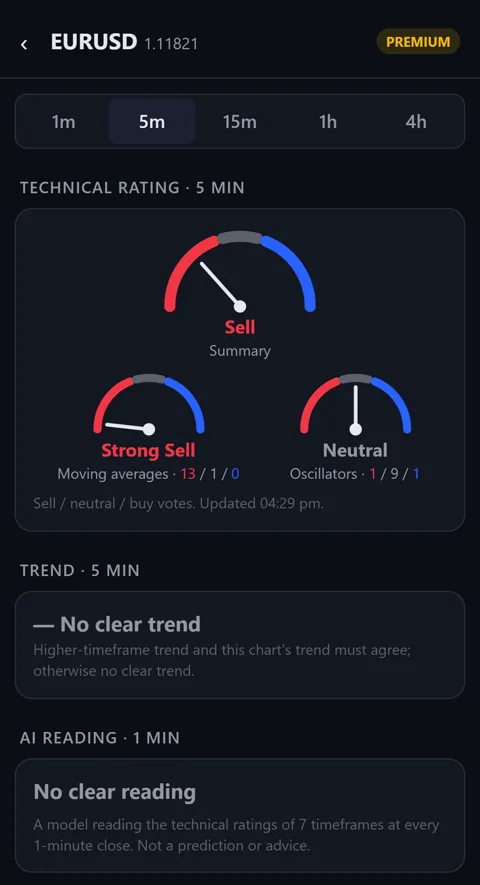
Free accounts see live prices, the technical rating and the trend. Premium adds these three and their alerts.
AI reading
A statistical model reads the technical ratings of seven timeframes together at every 1-minute close and shows "possible buy", "possible sell" or nothing. Three levels, from fewest readings to most. Forex and gold.
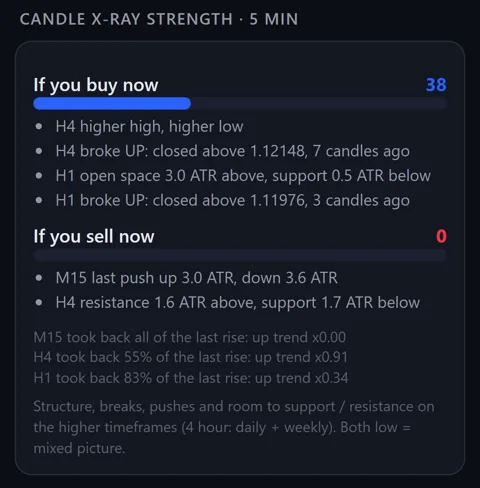
Candle X-Ray Strength
"If you buy now" and "If you sell now", each scored 0 to 100 from the structure of the higher timeframes, with the reasons listed in plain words - breaks, swings, room to support and resistance.
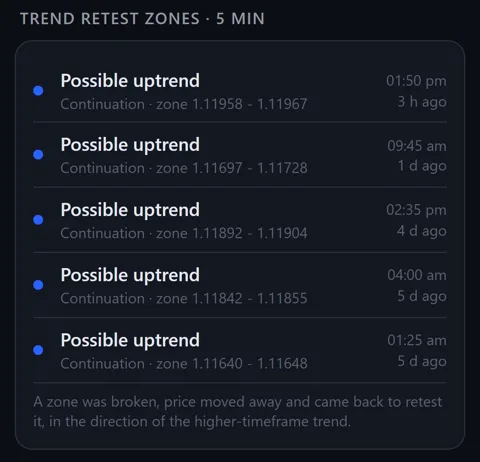
Trend Retest Zones
A zone that was broken, left and then retested in the direction of the higher-timeframe trend - labelled possible uptrend or downtrend, continuation or exhaustion, with its price range.
What it does
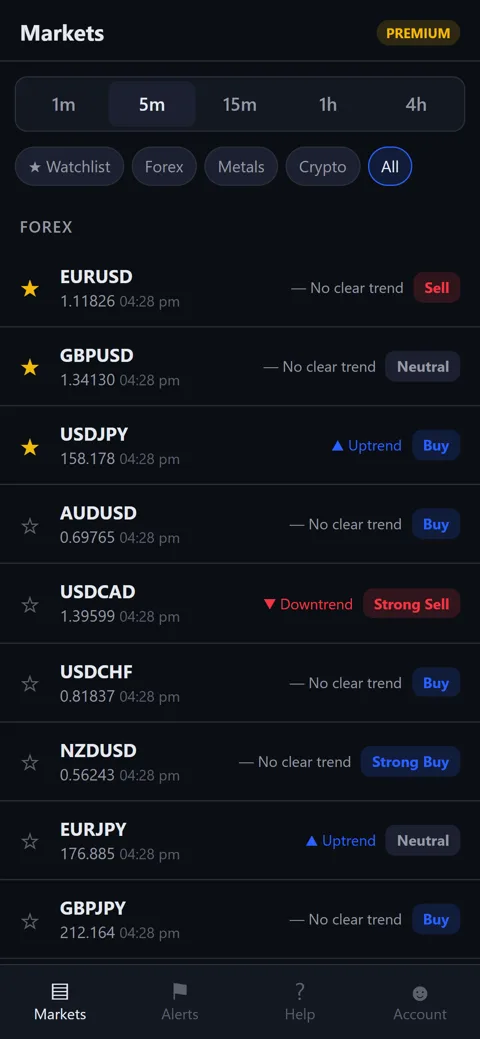
Markets and timeframes
- Forex: EURUSD, GBPUSD, USDJPY, AUDUSD, USDCAD, USDCHF, NZDUSD, EURJPY, GBPJPY, EURGBP.
- Metals: gold (XAUUSD) and silver (XAGUSD). Crypto: BTCUSD and ETHUSD.
- 1 minute, 5 minutes, 15 minutes, 1 hour and 4 hours, refreshed at every candle close.
- Watchlist with stars, and filters for Forex, Metals and Crypto.
Alerts
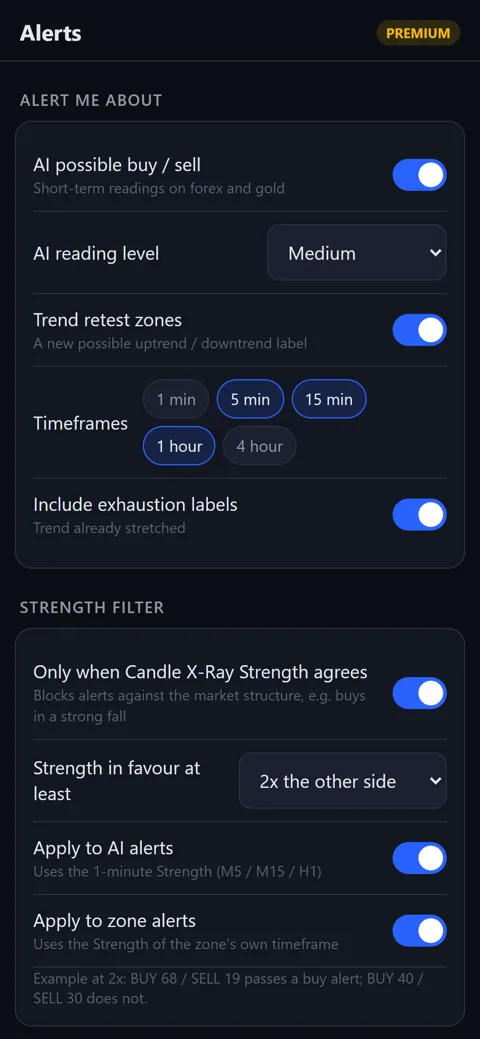
- AI possible buy / sell and new Trend Retest Zone labels, on the timeframes and markets you choose.
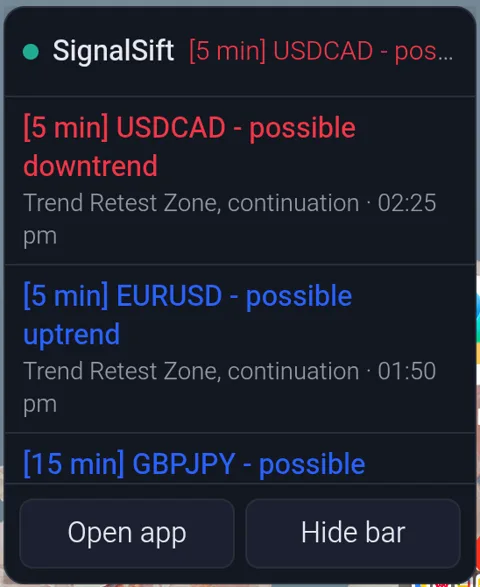
- Each alert starts with its timeframe - [1 min], [5 min], [1 hour] - so you know which chart it belongs to.
- Optional filter: only when Candle X-Ray Strength on that side is at least 2x the other side.
- One alert per move: repeated readings during a long slide or rally are held back.
With the screen off
- A background watcher keeps alerts coming with the app closed and the screen off.
- Notification, sound, vibration, and alerts read out loud in a voice you choose.
- An optional floating bar shows the latest alerts on top of any app.
- Alerts arrive within a few seconds of the candle close.
Good to know
- Prices come from a third-party feed and can differ slightly from your broker.
- One phone per account; logging in on a new phone moves your plan with you.
- The AI reading is quiet during the low-activity overnight hours (about 21:00-01:00 UTC).
- Android only for now.
Is it safe to install?
The app is not on the Play Store, so here is everything you can check for yourself before installing.
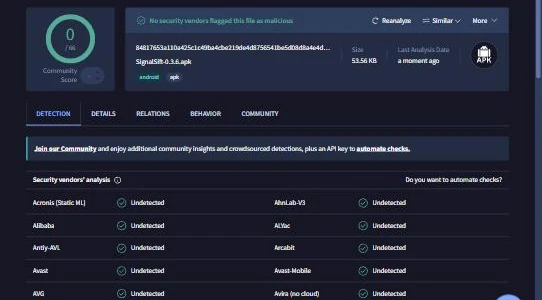
Scanned by more than 60 antivirus engines
Every version is scanned on VirusTotal, Google's free multi-antivirus service, before release - including Kaspersky, ESET, Bitdefender, Avast, McAfee, Microsoft, Symantec, Sophos and Trend Micro.
 Open the report
84817653a110a425c1c49ba4cbe219de4d8756541be5d08d8a4e4d58024e97d2
What it can and cannot touch
- Asks for: internet, notifications, vibration, running in the background, the optional floating bar, and installing its own updates.
- Never asks for: contacts, SMS, call log, location, camera, microphone, photos or files.
- No password is ever typed - you log in through Telegram.
- All connections are encrypted (https). No broker details, ever.
What we keep
- Your Telegram ID, name and username - to log you in.
- Your Telegram phone number and scrambled device codes - only to give one free trial per person and per phone.
- For payments: the transaction ID, sending wallet and amount.
- We do not sell or share your data. Ask support to delete your account at any time.
Getting started
Download
Tap Download for Android on your phone. When Android asks, allow installs from your browser, then tap Install. If Play Protect offers to scan it, let it.
Log in with Telegram
Tap Log in with Telegram, press Start in the bot chat and tap Share my phone number. Your 3-day trial of everything starts straight away.
Set up alerts
On the Alerts tab choose what you want to hear about, then switch on Keep watching and allow battery and autostart, so alerts keep coming with the screen off.
Subscribe in the app
Account → Payment → Cryptocurrency. Send the exact amount shown; the server checks the blockchain and switches Premium on by itself. Other ways to pay: message support.
Questions
Is this a signal service?
No. It is an analysis tool that shows what indicators and models read on each market. It does not tell you to trade, and no results are promised. You make your own decisions.
Why is it not on the Play Store?
It is distributed directly from this site. Before you install, you can check the antivirus report and the file fingerprint above, and the full permission list. The app updates itself from our server, and Android only accepts updates signed with the same key as the app you installed.
What do I get for free?
Live prices for all 14 markets, the technical rating gauges and the trend on every timeframe - with no time limit. Every new account also gets all premium tools and alerts free for 3 days.
How do I pay if I don't use crypto?
Tap Message us under the payment options in the app, or write to [email protected]. We will tell you the other ways to pay and switch your plan on once paid.
Will alerts work when my screen is off?
Yes, once Keep watching is on and battery saving is off for SignalSift. On Xiaomi, Redmi and POCO phones also switch on Autostart - the app has a button for it. The user guide has the steps for other phone brands.
Can I use it on more than one phone?
One phone per account at a time. Logging in on a new phone moves your plan there and logs the old one out.
Is there an iPhone version?
Not yet - Android only for now.
Questions before you install?
Ask about markets, alerts, your phone or payment - you will get a straight answer.